Open EchoFrame on any screen
TV, tablet, or phone: a single QR code appears. That's the whole interface, nothing to configure.
The thousands of photos buried in your Google Photos, back in the room, on the TV, a tablet, or a spare phone. Two-minute QR setup, even on your parents' TV. And you can try the demo without signing in to anything.


3-day free trial
See the two-minute setup ↓



Your Google Photos holds ten years of moments. Your walls hold none.
Every photo you take disappears into the cloud. EchoFrame brings them back into the room, on the TV, a tablet on the shelf, or a spare phone in a stand.
How it works
No cables, no typing passwords with a remote. Your phone does the work; the screen stays calm: one scan sets up Mom's TV even over a video call.
TV, tablet, or phone: a single QR code appears. That's the whole interface, nothing to configure.
Sign-in happens on your phone through Google. Your password is never typed into EchoFrame.
Choose the photos and videos you want with the Google Photos picker on your phone. Change the selection any time.
The frame starts playing right away, and keeps going on its own, on whichever screen you chose.
Privacy by design
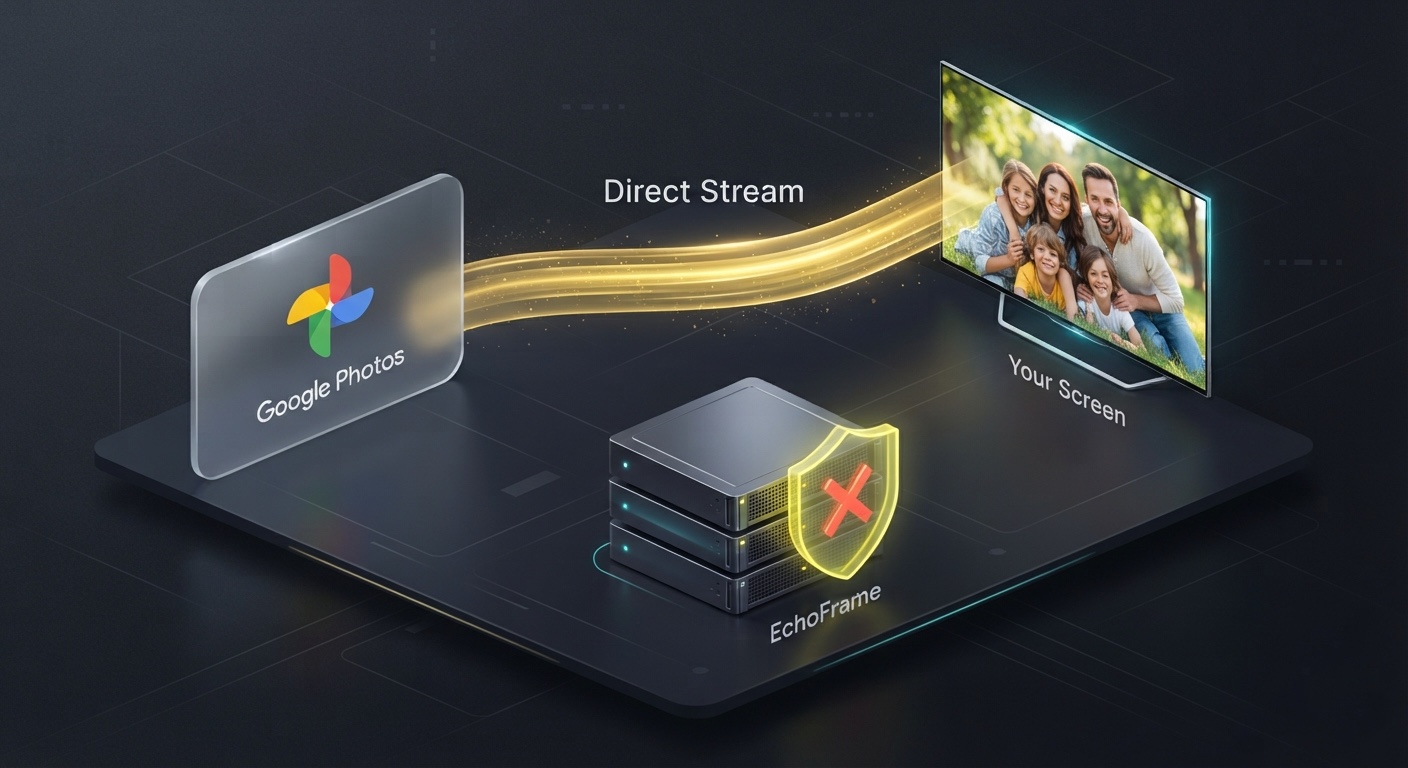
EchoFrame is a player, not a photo collector. Here is the entire journey your photos take.
The feature screensavers don't have
Tap two portrait photos below and watch what the frame does with them.


EchoFrame pairs them automatically. The whole screen stays full.
Works for portrait videos too: they get paired with a portrait photo.
No surprises
Most trial apps hide what comes next. Here's the entire story.
Trial
Your own Google Photos on screen, every feature unlocked. No payment method required: nothing can be charged when it ends.
After
Keep it with a small monthly plan (cancel anytime in the store) or a one-time lifetime purchase. The exact local price is shown in the store before you pay.
For comparison: a popular 10-inch photo frame costs $150–200, and that's before its battery dies or its firmware goes stale in a couple of years. EchoFrame lives on your TV, which updates itself anyway, and works under one account across every screen in the house, not a separate frame in every room.
FAQ
Install EchoFrame on your Android TV or Google TV, scan the on-screen QR code with your phone, sign in to Google Photos, and pick your photos. Your slideshow starts in about two minutes, and no password is ever typed on the TV. It also runs on tablets and a spare phone.
EchoFrame turns any TV into a digital photo frame: a full-screen slideshow of your Google Photos with gentle transitions, date labels, and shuffle. Set the slide duration once and leave it running: an always-on frame for the living room, kitchen, or bedside.
Yes. EchoFrame runs on Android tablets and spare Android phones as well as Android TV and Google TV, so you can give an old device a second life as an always-on Google Photos frame.
EchoFrame is an app that turns a TV, tablet, or spare phone into a living photo frame: a full-screen, ambient slideshow of the photos and videos in your Google Photos, with date labels, shuffle, and side-by-side portrait pairing.
No. A dedicated frame costs $150–200 for one small screen in one room, and some add yearly fees. EchoFrame uses screens you already own, as many rooms as you like, and pulls straight from your Google Photos, with no extra hardware to buy or ship.
Yes. EchoFrame offers a one-time lifetime purchase alongside a small monthly plan, plus a free demo with no sign-in. The exact price for your country is shown in your app store.
Google TV's built-in ambient mode auto-curates and sometimes shows only part of your library or reverts to default galleries. EchoFrame shows exactly the photos you pick, full-screen, and keeps cycling reliably on Google TV, Android TV, tablets, or a spare phone.
Yes. Setup is a two-minute QR scan with no password typed on the TV, so you can set it up on a parent's or grandparent's TV yourself, even over a video call. A popular way to gift a photo frame without shipping hardware.
Yes, pass the screen around. Each guest scans the QR code in turn and connects their own Google Photos, so the slideshow becomes theirs. Tap "Change Photos" to hand it to the next person, one at a time.
Yes. Home videos play right alongside your photos with smooth crossfade transitions, muted by default, with sound one toggle away.
Yes. You pick the photos with the Google Photos picker on your phone when you scan the QR code, so only what you choose appears on screen.
Yes. Instead of leaving big black bars, EchoFrame can pair two portrait photos side by side so vertical shots fill the screen.
Lights down. Frame on. Two minutes from now, this could be your living room.
3-day free trial